


SCARS Institute’s Encyclopedia of Scams™ Published Continuously for 25 Years
Typical Phishing Attacks
How Scams Work
A SCARS Insight
Typical Phishing Scam Attack: Apple Accounts
You May Be Receiving A New Apple Customer Phishing Attack Targeting Your iTunes Account
Subject: “Re:【Confirmation renewals 】 [Review acounts] Your information has been reset and changes information on Monday june 03 2019 09:11:06”
Appears To Come From: customer@email.apple.com
But Actually Comes From: slebew-6437239@martakasihotang.com
Actual text displays but is encrypted to prevent copying and pasting!
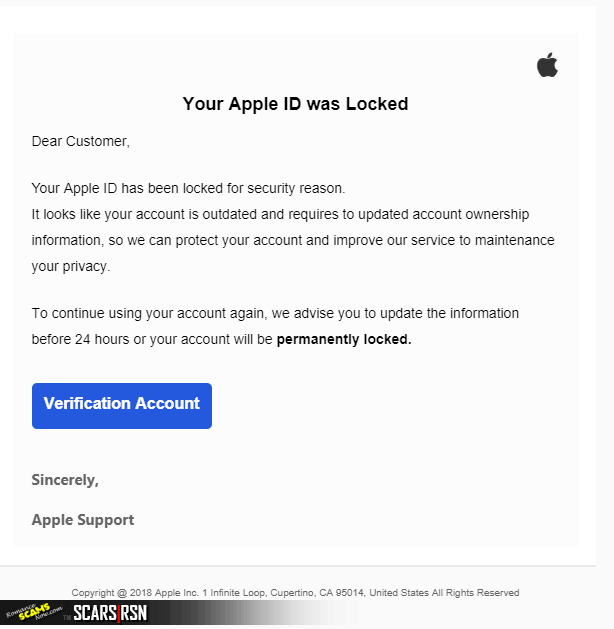
Anti-Scam Warning – The Following Is How The Phishing Email Appears:
Apple Account Phishing Email Attack
PHISHING SCAMS AND HOW TO SPOT THEM
Phishing is a type of online scam that targets consumers by sending them an e-mail that appears to be from a well-known source – an internet service provider, a bank, or a mortgage company, for example. It asks the consumer to provide personal identifying information. Then a scammer uses the information to open new accounts or invade the consumer’s existing accounts.
How To Recognize Phishing Scam Emails
Scammers often update their tactics, but there are some signs that will help you recognize a phishing email or text message.
Phishing emails and text messages may look like they’re from a company you know or trust. They may look like they’re from a bank, a credit card company, a social networking site, an online payment website or app, or an online store.
Phishing emails and text messages often tell a story to trick you into clicking on a link or opening an attachment. They may
- say they’ve noticed some suspicious activity or log-in attempts
- claim there’s a problem with your account or your payment information
- say you must confirm some personal information
- include a fake invoice
- want you to click on a link to make a payment
- say you’re eligible to register for a government refund
- offer a coupon for free stuff
Remember:
Always Check …
- Actual Sending Address
- Never Open Unless You Are Expecting It
- Always Go To The Real Website To Login – Use Google If You Do Not Remember The Web Address
- Never Click Links Or Buttons In Random Emails That Arrive In Your Inbox
FOUR STEPS TO PROTECT YOURSELF FROM PHISHING
1. Protect your computer by using security software. Set the software to update automatically so it can deal with any new security threats.
2. Protect your mobile phone by setting software to update automatically. These updates could give you critical protection against security threats.
3. Protect your accounts by using multi-factor authentication. Some accounts offer extra security by requiring two or more credentials to log in to your account. This is called multi-factor authentication. The additional credentials you need to log in to your account fall into two categories:
- Something you have—like a passcode you get via text message or an authentication app.
- Something you are—like a scan of your fingerprint, your retina, or your face.
- Multi-factor authentication makes it harder for scammers to log in to your accounts if they do get your username and password.
4. Protect your data by backing it up. Back up your data and make sure those backups aren’t connected to your home network. You can copy your computer files to an external hard drive or cloud storage. Back up the data on your phone, too.
What To Do If You Suspect A Phishing Attack
If you get an email or a text message that asks you to click on a link or open an attachment, answer this question: Do I have an account with the company or know the person that contacted me?
If the answer is “No,” it could be a phishing scam. Go back and review the tips in How to recognize phishing and look for signs of a phishing scam. If you see them, report the message and then delete it.
If the answer is “Yes,” contact the company using a phone number or website you know is real. Not the information in the email. Attachments and links can install harmful malware.
What To Do If You Responded To A Phishing Email
If you think a scammer has your information, like your Social Security, credit card, or bank account number, go to IdentityTheft.gov. There you’ll see the specific steps to take based on the information that you lost.
If you think you clicked on a link or opened an attachment that downloaded harmful software, update your computer’s security software. Then run a scan.
How To Report Phishing
If you got a phishing email or text message, report it. The information you give can help fight the scammers.
Step 1.
If you got a phishing email – DO ALL OF THE FOLLOWING:
- forward it to the FTC at spam@uce.gov
- forward to the Anti-Phishing Working Group at reportphishing@apwg.org.
If you got a phishing text message, forward it to SPAM (7726).
Step 2.
- Report the phishing attack to the FTC at ftc.gov/complaint
- Report the email address on www.Anyscam.com for distribution worldwide
Always
STOP | THINK | CONNECT
PLEASE SHARE OUR ARTICLES WITH YOUR FRIENDS & FAMILY
HELP OTHERS STAY SAFE ONLINE – YOUR KNOWLEDGE CAN MAKE THE DIFFERENCE!
THE NEXT VICTIM MIGHT BE YOUR OWN FAMILY MEMBER OR BEST FRIEND!
By the SCARS™ Editorial Team
Society of Citizens Against Relationship Scams Inc.
A Worldwide Crime Victims Assistance & Crime Prevention Nonprofit Organization Headquartered In Miami Florida USA & Monterrey NL Mexico, with Partners In More Than 60 Countries
To Learn More, Volunteer, or Donate Visit: www.AgainstScams.org
Contact Us: Contact@AgainstScams.org
-/ 30 /-
What do you think about this?
Please share your thoughts in a comment below!
Table of Contents
To Understand All Scams
Read This
The SCARS Institute Relationship Scams Formula Checklist
This is the Formula that all Relationship Scams Follow




In the U.S. & Canada
U.S. & Canada Suicide Lifeline 988

Recent Comments
On Other Articles
- Barbara on SCARS Institute – Romance Scam Simulator: “Fantastic! I have to go to bed, but I’ll do some more tomorrow. I picked an easy scenario tonight, but…” Oct 9, 18:01
- on United States – Federal Bureau of Investigations [FBI]: “It is only that way because of the shame you feel. The reality is that it was not your fault.…” Sep 30, 15:36
- on United States – Federal Bureau of Investigations [FBI]: “yhisis humiliating experience e and isembarassassing to to own up to peolealreadyassume u are not to bright because Arnold and…” Sep 30, 12:28
- on United States – Federal Bureau of Investigations [FBI]: “should be better known by public live in assisiwdlivi g apartment many manyinstancresof Romance scams here ano.us ederly l” Sep 30, 12:24
- on Is It A Scam? Phone Scam Diagnostic – v1: “I tried the this test Is it a phone scam? Mine was. I think this is a helpful tool to…” Sep 30, 10:34
- on Is It A Scam? Romance Scam Diagnostic – v2: “Carole, as you move forward with your recovery, you will learn how this all works. It was not your fault.…” Sep 29, 17:37
- on Is It A Scam? Romance Scam Diagnostic – v2: “I was blinded by such clever manipulation” Sep 29, 15:15
- on The SCARS Institute Relationship Scams Formula Checklist – 2026: “As I read this I could see myself in every step with my scam. I gained a lot more knowledge…” Aug 28, 19:51
- on The Persistence of Danielle Delaunay as a Fake Identity – 2026: “Unfortunately, you are being scammed. She is using a fake name regardless. At this point, your best option is to…” Aug 26, 20:16
- on The Persistence of Danielle Delaunay as a Fake Identity – 2026: “Dear Sirs, I have met this woman with the name Abigail Boateng in Ghana. I have an intensive mail contact…” Aug 26, 12:28

Thank you for your comment. You may receive an email to follow up. We never share your data with marketers.