




SCARS Institute’s Encyclopedia of Scams™ Published Continuously for 25 Years



WARNING: AI-Enabled Browsers Pose a Cybersecurity Risk – 2025
A Cybersecurity Risk: The Hidden Dangers of AI-Enabled Web Browsers
Cybersecurity / AI-Artificial Intelligence – A SCARS Institute Insight
Author:
• Tim McGuinness, Ph.D., DFin, MCPO, MAnth – Anthropologist, Scientist, Director of the Society of Citizens Against Relationship Scams Inc.
See Author Biographies Below
Article Abstract
AI-enabled browsers like ChatGPT Atlas, Comet, and Microsoft’s Edge with Co-Pilot offer a tempting promise of convenience, allowing AI assistants to browse the web on your behalf. However, this convenience comes at a significant cost, as these systems gain access to your logged-in accounts, saved passwords, and personal data. The risks are substantial, ranging from data breaches and unauthorized actions to privacy invasions and malicious use. Users must be acutely aware of these dangers and take proactive steps to protect themselves, such as using strong, unique passwords, enabling two-factor authentication, and regularly reviewing account activity. As AI technology advances, both developers and users must prioritize security and transparency to ensure that the benefits of AI-enabled browsing do not outweigh the potential for harm.

A Cybersecurity Warning: The Hidden Dangers of AI-Enabled Web Browsers
In the world of web browsing technology and cybersecurity threats, AI-enabled browsers like ChatGPT Atlas, Comet, and Microsoft’s Edge with Co-Pilot have emerged as tools promising to streamline web interactions. These browsers offer the prospect of an AI assistant that can browse the internet on your behalf, handling tasks from simple searches to complex data retrieval. However, beneath the surface of this technology lies a vast web of potential cybersecurity and privacy risks that users should be acutely aware of before embracing these tools.
What is an AI-Enabled Browser?
An AI-enabled browser is a web browser that includes a built-in digital assistant powered by artificial intelligence. This assistant can perform a variety of tasks to help users navigate the web more efficiently. Imagine having a super-smart friend who can assist with almost any online activity; that is the essence of an AI-enabled browser.
These browsers offer more than just displaying websites. They can actively help users find information, fill out forms, and even make decisions based on the user’s needs. For instance, if a user is planning a trip, the AI can suggest destinations, find the best deals on flights and hotels, and even complete the booking process. When shopping online, the AI can compare prices across different websites and help users find the best offers. It can also answer questions, draft emails, and create content tailored to the user’s requirements.
The AI in these browsers is designed to understand and anticipate user needs, providing helpful suggestions and actions. Over time, it can learn from the user’s browsing habits to offer more personalized assistance. However, this level of help requires the AI to access the user’s personal data and online activities, which can pose certain risks.
So, an AI-enabled browser is a web browsing tool with an integrated smart assistant that can handle a wide range of online tasks, offering users a more convenient and personalized web experience.
The Allure and the Cybersecurity Risks of AI-Browsers
The appeal of AI-enabled browsers is clear. Having a digital assistant that much more expertly find what you are looking for, improve your interactions and content creation, that can log into your accounts, retrieve curated information, and even make purchases on your behalf. This level of convenience is very tempting, especially for those seeking to optimize their time. However, this convenience comes at a significant cost, granting these AI systems access to your most sensitive and personal data.
Remember the first rule of new technology development: “Move fast and break things.” This mantra, once celebrated in the tech industry, has far too often often led to the rapid deployment of innovative solutions without adequate consideration for the potential consequences. This idea literally kills people, just look at platform-enabled scams as an example. In the context of AI-enabled browsers, this approach can be particularly dangerous. As developers race to integrate advanced AI capabilities into browsing experiences, they appear to be overlooking critical security and privacy concerns. The rush to market can result in vulnerabilities that are exploited by cybercriminals, but even more importantly, by the very AI they are trusting, leaving users exposed to data breaches, identity theft, and other malicious activities. While innovation is essential for progress, it must be balanced with a commitment to security and user protection. Users should be wary of adopting new technologies without a thorough understanding of the risks involved and demand that companies prioritize safety and transparency in their development processes.
This danger is real. When you enable an AI browser, you are essentially handing over the keys to your digital kingdom. These systems can access your logged-in accounts, saved passwords, and a wealth of personal information that you may not even realize is stored in your browser. This level of access is a double-edged sword. On one hand, it allows the AI to perform tasks with remarkable efficiency. On the other, it exposes your data to potential vulnerabilities and misuse, making you an easy target for cybercriminals.
What Could Go Wrong?
The potential for things to go awry with AI-enabled browsers is substantial, and the risks are often more severe than users realize. Here are some real scenarios that could impact you directly:
- Data Breaches and Leaks: One of the most concerning risks is the potential for data breaches. If an AI browser is compromised, hackers could gain access to your saved passwords, login credentials, and other sensitive information. This could lead to unauthorized access to your email, banking, and shopping accounts, resulting in identity theft and significant financial loss. Imagine waking up to find that your life savings have been drained from your bank account, or that your identity has been stolen and used to open new lines of credit in your name. This might happen even without a true breach, since the AI might share information simply as part of a normal user request.
- Unintended Actions: AI systems, while advanced, are not infallible. They can misinterpret instructions or act on incorrect information, leading to unintended consequences. For example, an AI might accidentally make a purchase from your shopping account or send an email from your inbox, causing confusion and potential embarrassment. In a more severe scenario, an AI could interpret a command to “check my balance” as an instruction to “transfer my entire balance to this unknown account,” leaving you with empty pockets and a lot of explaining to do. What about your online banking; would you trust an AI with your money?
- Privacy Invasion: By granting an AI browser access to your personal data, you are essentially allowing it to build a detailed profile of your online activities. This includes your search history, browsing habits, and even your location data. While this information can be used to provide a more personalized experience, it also raises significant privacy concerns, especially if this data is shared with third parties or used for targeted advertising. Your every move online could be tracked and sold to the highest bidder, turning your digital life into a commodity.
- Malicious Use: There is also the risk of malicious use by bad actors who might exploit vulnerabilities in the AI system. For instance, a hacker could manipulate the AI to perform actions on your behalf, such as transferring funds from your banking account or subscribing you to unwanted services. You might find yourself suddenly subscribed to a dozen new streaming services or with a hefty bill for products you never ordered, all because the AI misunderstood a command or was tricked by a malicious actor.
- Lack of Transparency: Many AI-enabled browsers operate as “black boxes,” meaning their internal workings and decision-making processes are not fully transparent to users. This lack of transparency makes it difficult to understand how your data is being used and protected, adding another layer of risk. You might be unaware of the extent to which your data is being shared or how it is being used to influence your online experience, leaving you vulnerable to manipulation and exploitation.
AI-Enabled Browser Real-World Risk Scenarios
To illustrate the potential impact of these risks, let’s consider a few real-world scenarios:
- Scenario 1: The Compromised Email Account: Imagine you have an AI browser that is logged into your gmail account. One day, you receive a notification that your email has been accessed from an unfamiliar location. You soon discover that the AI, acting on a misinterpreted command, has sent sensitive information to the wrong recipient. This could lead to a breach of confidentiality and potential legal repercussions. Worse still, if the AI has access to your email, it could be used to launch phishing attacks or spread malware to your contacts, turning you into an unwitting accomplice in a cybercrime.
- Scenario 2: The Unauthorized Purchase: You have an AI browser that is connected to your shopping accounts. While you are away, the AI, misunderstanding a voice command, places a large order from one of your favorite online retailers. When the items arrive, you are left with a hefty bill and a lot of unwanted goods, not to mention the hassle of returning them. In a more sinister scenario, the AI could be manipulated to make purchases from dark web marketplaces, leaving you with illegal goods and a trail of digital evidence that could implicate you in criminal activities.
- Scenario 3: The Identity Theft: A hacker gains access to your AI browser and, through it, to your saved passwords and login credentials. They use this information to log into your banking account and transfer funds to an unknown destination. By the time you realize what has happened, your finances are in disarray, and you are left dealing with the aftermath of identity theft. You might spend months or even years trying to recover your identity and repair the damage done to your credit and financial standing, all because you trusted an AI with too much access to your personal information.
- Scenario 4: Online Banking Chaos: This is potentially the scariest fo them all, since the AI browser will know your online banking login, and is able to observe all of your transactions. Could it perform its own transactions or transfers? Maybe not quite yet, but this is coming.
- Scenario 5: Multiple Users on the Same Device or Computer: The browser is a device that is part of the device or computer’s ecosystem. No one knows right now with certainty whether the browser has access to browsing details of other users on the same device. Could someone query the browser’s AI about things other users did on that device?
List of AI-Enabled Browsers and How to Disable AI Features
Please note that the following may age quickly and become obsolete. Perform a search for your browser to obtain the latest information.
ChatGPT Atlas Browser
How to Disable AI Features:
- Open the ChatGPT Atlas browser.
- Click on the three-dot menu in the top-right corner.
- Select “Settings” from the dropdown menu.
- Navigate to the “Privacy and Security” section.
- Find the option labeled “AI-Assisted Browsing” and toggle it off.
- Confirm your choice if prompted.
Comet Browser
How to Disable AI Features:
- Launch the Comet Browser.
- Click on the gear icon in the top-right corner to open settings.
- Go to the “Advanced” tab.
- Look for the “AI Features” section.
- Uncheck the box next to “Enable AI Assistance.”
- Restart the browser to apply the changes.
Microsoft Edge Browser with Co-Pilot
How to Disable AI Features:
- Open Microsoft Edge.
- Click on the three-dot menu in the top-right corner.
- Select “Settings” from the dropdown menu.
- Go to the “Privacy, search, and services” section.
- Scroll down to the “Services” subsection.
- Find the “AI Features” toggle and turn it off.
- Restart the browser to ensure the changes take effect.
Brave Browser with Summon
How to Disable AI Features:
- Open the Brave Browser.
- Click on the three-dot menu in the top-right corner.
- Select “Settings” from the dropdown menu.
- Go to the “Additional Settings” section.
- Find the “AI and Machine Learning” subsection.
- Toggle off the “Summon AI Assistant” feature.
- Restart the browser to apply the changes.
Opera Browser with AI Sidebar
How to Disable AI Features:
- Launch the Opera browser.
- Click on the “O” menu in the top-left corner.
- Select “Settings” from the dropdown menu.
- Go to the “Advanced” section.
- Find the “AI Sidebar” option and uncheck it.
- Restart the browser to ensure the changes are applied.
Vivaldi Browser with AI Integration
How to Disable AI Features:
- Open the Vivaldi browser.
- Click on the Vivaldi menu in the top-left corner.
- Select “Settings” from the dropdown menu.
- Go to the “Privacy” tab.
- Find the “AI Features” section and toggle it off.
- Restart the browser to apply the changes.
Safari Browser with AI Enhancements
How to Disable AI Features:
- Open Safari on your Mac.
- Click on “Safari” in the menu bar and select “Preferences.”
- Go to the “Privacy” tab.
- Find the “AI Enhancements” section and uncheck the box.
- Restart Safari to ensure the changes take effect.
Firefox Browser with AI Assist
How to Disable AI Features:
- Launch Firefox.
- Click on the three-line menu in the top-right corner.
- Select “Settings” from the dropdown menu.
- Go to the “Privacy & Security” section.
- Scroll down to the “AI Assist” subsection.
- Toggle off the “Enable AI Assist” feature.
- Restart the browser to apply the changes.
DuckDuckGo Browser with AI Tools
How to Disable AI Features:
- Open the DuckDuckGo Browser.
- Click on the three-dot menu in the top-right corner.
- Select “Settings” from the dropdown menu.
- Go to the “Privacy” tab.
- Find the “AI Tools” section and toggle it off.
- Restart the browser to ensure the changes are applied.
Arc Browser with AI Capabilities
How to Disable AI Features:
- Launch the Arc Browser.
- Click on the three-dot menu in the top-right corner.
- Select “Settings” from the dropdown menu.
- Go to the “Advanced” section.
- Find the “AI Capabilities” option and uncheck it.
- Restart the browser to apply the changes.
Google Chrome Browser with Gemini AI
To disable AI features in Chrome with Gemini, you can follow these steps:
- Turn Off Gemini Button and Keyboard Shortcut:
- Open Chrome and click on the three-dot menu in the top-right corner.
- Select “Settings” from the dropdown menu.
- Go to the “AI Innovations” section.
- Toggle off the “Gemini button” and disable its keyboard shortcut (Alt + G by default).
- Use Chrome Flags to Disable AI Mode:
- Type chrome://flags in the address bar and press Enter.
- Search for “AI mode Omnibox entrypoint” and disable it.
- Relaunch Chrome for the changes to take effect.
- Remove Gemini AI Overview from Search Results:
- Click on the three-dot menu in the top-right corner of Chrome and select “Settings.”
- Look for options related to search results and labs under the “Search” section.
- Disable Gemini to remove its influence on search results.
- Install Extensions for Additional Control:
- Go to the Chrome Web Store and search for extensions like “GemiNope,” which uses CSS to hide Gemini integrations.
- Install the extension and refresh your page to apply the changes.
- Change Default Assistant on Chromebooks:
- Open the Settings on your Chromebook.
- Go to Google settings and select Google Assistant.
- Set Google Assistant as the default to stop Gemini from acting as the primary assistant.
By following these steps, users can disable the AI features in their respective browsers, reducing the risk of data breaches and unauthorized access to their personal information.
Protecting Yourself
If you decide to experiment with AI-enabled browsers, there are several steps you can take to help protect yourself:
- Use Strong, Unique Passwords & a Top Password Manager: Ensure that all your accounts have strong, unique passwords. This reduces the risk of a single compromised password leading to a cascade of security breaches. Consider using a password manager to generate and store complex passwords, making it easier to maintain strong security without the hassle of remembering multiple passwords. The SCARS Institute recommends the Bitwarden Password Manager.
- Enable Two-Factor Authentication (2FA): Wherever possible, enable two-factor authentication for your accounts. This adds an extra layer of security, making it much harder for unauthorized users to gain access. Even if a hacker manages to steal your password, they will still need access to your second factor, such as a fingerprint or a code sent to your phone, to gain entry to your accounts.
- Regularly Review Account Activity: Keep a close eye on your account activity, especially for financial and email accounts. Look out for any unusual or unauthorized actions and address them promptly. Set up alerts for large transactions or changes to your account settings, so you are notified immediately if something seems amiss. This vigilance can help you catch and mitigate potential breaches before they cause significant damage.
- Limit Browser Access: Be selective about which accounts and data you allow the AI browser to access. Only grant access to essential safe accounts and limit the scope of the AI’s permissions. Create separate, less privileged accounts for tasks that do not require full access to your personal information, reducing the potential impact of a breach.
- Keep Software Updated: Ensure that your browser and all associated software are kept up to date. Updates often include security patches that address known vulnerabilities. Enable automatic updates where possible, so you are always protected by the latest security measures. This proactive approach can help prevent many common attacks and exploits.
- Use a Dedicated Browser: Consider using a dedicated browser for AI-assisted tasks, separate from your primary browsing activities. This can help contain any potential breaches and limit the impact on your personal data. Keep this dedicated browser clean and free of extensions or plugins that could introduce additional security risks.
- Educate Yourself: Stay informed about the latest developments in AI and cybersecurity. Understanding the potential risks and how to mitigate them can help you make more informed decisions about your online activities. Follow reputable cybersecurity blogs and news sources, and consider taking online courses or attending webinars to deepen your knowledge and stay ahead of emerging threats.
The Future of AI-Enabled Browsers
As AI technology continues to evolve, it is likely that AI-enabled browsers will become more sophisticated and capable. However, with this increased capability comes an even greater responsibility to ensure the safety and security of user data. Developers and companies must prioritize the implementation of robust security measures and transparency in their AI systems. This includes regular security audits, clear privacy policies, and user-friendly settings that allow individuals to control and understand how their data is being used.
Users, on the other hand, must remain vigilant and proactive in protecting their personal information. This involves not only taking the steps outlined above but also advocating for stronger privacy protections and holding companies accountable for the security of their AI systems. By staying informed and engaged, users can play a crucial role in shaping the future of AI-enabled browsing, ensuring that convenience does not come at the expense of security and privacy.
Conclusion
AI-enabled browsers like ChatGPT Atlas, Comet, and Microsoft’s Edge with Co-Pilot offer a glimpse into the future of web browsing, promising convenience and efficiency. However, the risks associated with granting these systems access to your personal data cannot be overlooked. By understanding the potential dangers and taking proactive steps to protect yourself, you can navigate the world of AI-enabled browsing with greater confidence and security. Remember, the key to safe and responsible use of these technologies lies in awareness, caution, and a commitment to protecting your digital identity.
In a world where technology is advancing at an unprecedented pace, it is more important than ever to stay informed and vigilant. The allure of AI-enabled browsers is undeniable, but so are the risks. By taking a cautious and proactive approach, you can harness the power of these tools while minimizing the potential for harm. Your digital safety is in your hands, and with the right knowledge and tools, you can ensure that your online experience is both convenient and secure.

Glossary
- Account compromise — This term describes unauthorized access to an online account through stolen credentials, cookies, or tokens. Victims may see password resets, unread messages marked as read, or settings changed without consent. You should assume other linked accounts are at risk and act quickly.
- Account recovery plan — This plan outlines prepared steps to regain control after a breach. It includes stored backup codes, alternative contact methods, and a list of providers to notify. You can keep a printed copy in a safe place.
- Activity alerts — These notifications report sign-ins, password changes, or money movements. They help detect misuse early when an AI-enabled browser or attacker acts without notice. You can enable alerts for email, banks, and major shopping sites.
- AI-enabled browser — This browser allows an assistant to read pages, click buttons, and act while signed in. The tool can speed up tasks but also expands the blast radius if anything goes wrong. You can confine it to low-risk accounts.
- AI permission scope — This scope defines what an assistant may access or do while browsing. Broad scopes can expose messages, purchases, and payment methods. You can limit scopes to only what a task requires.
- AI prompt injection — This attack plants hidden instructions on a web page that an assistant may obey. The assistant might exfiltrate data or perform actions that the user never intended. You can avoid running assistants on untrusted sites.
- API key leakage — This incident occurs when secret keys stored in a browser or extension are exposed. Criminals can run up charges or drain connected services. You can rotate keys and store them in dedicated vaults.
- App-specific password — This unique password grants limited access to one application without revealing the main password. It reduces damage if a single tool is compromised. You can revoke it without affecting the primary login.
- Browser autofill vault — This vault holds saved passwords, addresses, and cards for quick form filling. It becomes a target when an assistant can read and submit forms. You can clear it on sensitive devices.
- Browser profile separation — This practice uses distinct profiles for work, banking, and experimentation. Separation limits what an assistant or attacker can see in a breach. You can create a profile that never stores passwords.
- Browser sync data — This data includes bookmarks, history, and credentials synchronized across devices. A single compromise can spread risk to all synced endpoints. You can turn off sync for sensitive items.
- Card-on-file — This stored payment method speeds purchases at retailers. It also enables unauthorized orders when an assistant misfires or an attacker gains access. You can remove saved cards after each transaction.
- Credential stuffing — This attack tries reused passwords from one breach against other sites. AI tools can automate attempts at a large scale. You can stop it with unique passwords and multi-factor authentication.
- Data minimization — This practice keeps only what is necessary in the browser. Less stored data reduces loss when assistants have access. You can download statements to a secure archive and purge local copies.
- Dedicated banking browser — This separate browser handles only financial tasks with no extensions. Isolation reduces the chance that an assistant or plugin can touch money accounts. You can whitelist bank domains and block everything else.
- Device sharing risk — This risk arises when multiple people use the same computer account. Assistants may read histories or cookies from other users on the device. You can create separate logins for each person.
- Disposable payment card — This virtual or single-use card number limits spend and time. It protects the main account during experimental browsing. You can generate a new number for each merchant.
- Email forwarding rule abuse — This technique sets secret rules that copy mail to an attacker. Victims may miss alerts and see fraud escalate. You can review and delete unfamiliar rules.
- Extension risk — This risk comes from add-ons that request wide permissions. Malicious or abandoned extensions may leak data to third parties. You can remove any extension that is not essential.
- Financial account lock — This temporary lock halts transfers or new payees while an incident is handled. It provides breathing room to investigate unauthorized activity. You can request a lock from the bank’s fraud team.
- Freeze credit file — This freeze stops new loans and cards until lifted. It is a strong response to identity theft from a browser breach. You can place freezes at all major credit bureaus.
- Geolocation mismatch alert — This alert triggers when sign-ins occur from unusual places. It often signals stolen cookies or automated sessions. You can deny access and reset sessions immediately.
- Hard logout across devices — This action invalidates all sessions and requires fresh logins. It clears stolen cookies that assistants or attackers might reuse. You can trigger it from security settings.
- Hardware security key — This physical key provides phishing-resistant authentication. It blocks many automated actions by assistants or attackers who lack the device. You can register two keys and store one as backup.
- Identity monitoring — This service watches for exposed personal data and new credit lines. It helps victims catch downstream fraud after a browser incident. You can use it alongside a credit freeze.
- Knowledge-based authentication risk — This risk involves security questions that rely on public or guessed facts. Attackers and assistants can infer answers from social media and history. You can replace questions with stronger methods.
- Least privilege access — This principle grants only the permissions required for a task. Narrow access reduces harm when tools go wrong. You can apply it to assistants, extensions, and team roles.
- Login notification — This message reports new sign-ins on an account. It is an early warning for session theft or assistant misuse. You can turn on notifications by email, SMS, or app.
- One-time password fatigue attack — This harassment floods a phone with repeated codes or prompts. Victims may accept a request by mistake. You can switch to hardware keys to resist it.
- Payment tokenization — This process substitutes sensitive card numbers with tokens. It limits exposure if an assistant submits a payment. You can prefer merchants that support network tokens.
- Permission creep — This gradual expansion of access grows over time without review. Creep widens damage when a breach occurs. You can schedule quarterly permission audits.
- Phishing-resistant MFA — This authentication uses hardware keys or device-bound passkeys. It prevents most automated takeovers that rely on captured codes. You can enroll passkeys on primary devices.
- Recovery email hygiene — This practice secures the addresses used for password resets. If attackers control recovery channels, they control the account. You can lock down recovery emails with strong MFA.
- Remote session hijack — This takeover uses stolen cookies or injected scripts to control an active session. It bypasses passwords because the session is already trusted. You can reset all sessions and rotate passwords.
- Revoke third-party access — This cleanup removes connected apps that no longer need data. Old connections leak information and create blind spots. You can review the list in the account security pages.
- Shopping account audit — This review checks addresses, cards, subscriptions, and order history. It helps find silent unauthorized purchases by assistants or attackers. You can remove saved cards and close old accounts.
- Transaction alerts — These messages flag withdrawals, transfers, and new payees. Fast alerts cut losses when misuse begins. You can set low thresholds to catch small test charges.
- Trusted contacts plan — This plan names people who can help during an incident. It includes how to reach them and what steps they can take. You can share only what is necessary for support.
- Unintended automated action — This event occurs when an assistant misinterprets a request and acts incorrectly. Purchases, emails, or transfers may occur without clear consent. You can require confirmations for high-risk actions.
- Unusual device detection — This feature flags sign-ins from new hardware. It can reveal token theft or cloned browsers. You can block access and force reauthentication.
- Virtual card numbers — These numbers act as stand-ins for real cards online. They limit exposure and can be locked after use. You can generate them through banks or privacy services.
- Walled-off financial workspace — This isolated user profile or operating system account handles money tasks only. It keeps browsing experiments away from finances. You can protect it with hardware-backed MFA and no extensions.
Author Biographies
To Understand All Scams, Read This:
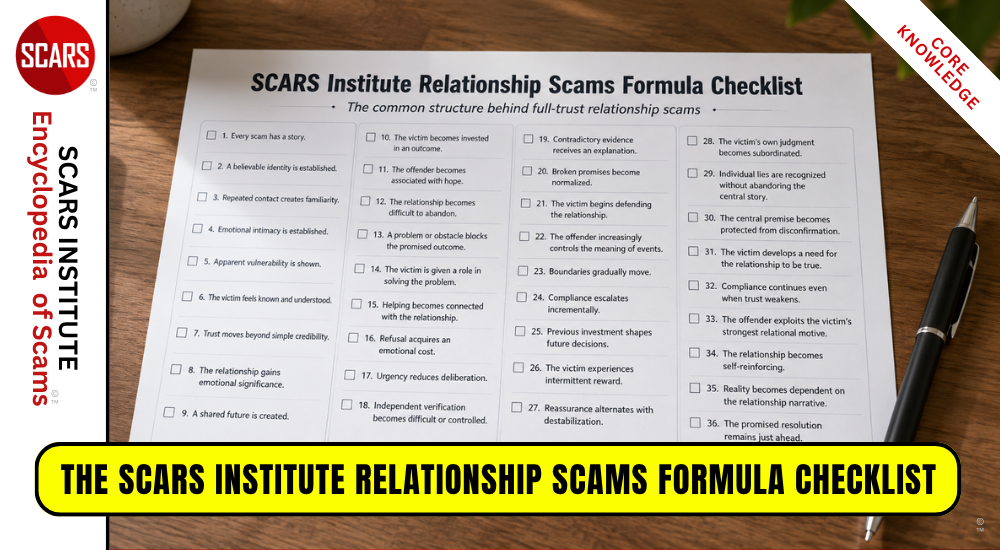
The SCARS Institute Relationship Scams Formula Checklist
This is the Formula that all Relationship Scams Follow
-/ 30 /-
What do you think about this?
Please share your thoughts in a comment below!
Table of Contents





Rapid Report Scammers

In the U.S. & Canada

U.S. & Canada Suicide Lifeline 988
LEAVE A COMMENT?
Recent Comments
On Other Articles
- SCARS Institute Editorial Team on The Persistence of Danielle Delaunay as a Fake Identity – 2026: “Knowing they are criminals, why would you want to talk to them? Avoid all strangers online.” Aug 19, 12:54
- on The Persistence of Danielle Delaunay as a Fake Identity – 2026: “THERE ARE THREE DANIELLE DELAUNAYS ON FACEBOOK RIGHT NOW USEING HER NAME AND PHOTOS. I’M BEING TOLD THEY ARE ALL…” Aug 19, 11:15
- on Natalie Sparks: Have You Seen Her? Another Stolen Face / Stolen Identity: “John, we are sorry, but you are still being scammed.” Aug 19, 09:52
- on #1 Worldwide – SCARS Anyscam.com: “You have been scammed. The unfortunate part about the images is difficult to address. You can learn more about Sextortion…” Aug 19, 09:48
- on SCARS™ Scam News Now: Six Ghanaian Scammers Arrested in the U.K. For Online Fraud: “Ann, recognizing that it was a scam is the first step in healing. We can help in your after-scam healing…” Aug 19, 09:47
- on Natalie Sparks: Have You Seen Her? Another Stolen Face / Stolen Identity: “She my wife to be, She is well holding down a job & is taking care of her grandma, both…” Aug 15, 22:25
- on #1 Worldwide – SCARS Anyscam.com: “Good day, I was in contact with Jenny Florence Albert, a doctor from Afghanistan. She claims to be from England…” Aug 2, 14:38
- on SCARS™ Scam News Now: Six Ghanaian Scammers Arrested in the U.K. For Online Fraud: “I’m a victim read my sad story: What followed was a relentless, agonizing descent into financial trickery. Ann wired the…” Jul 28, 13:52
- on Romance Scams Detection Training Tool – 2026: “Wow, it could be really difficult to spot this as AI generated when not knowing about scammers tactis. This tool…” Jul 24, 14:50
- on Bank Impersonation Scams – 2026: “It is truly sad that technology and all of these soohisticated tactics are employed for commiting crimes. It is always…” Jul 24, 10:20
ARTICLE META
Important Information for New Scam Victims
- Please visit www.ScamVictimsSupport.org – a SCARS Website for New Scam Victims & Sextortion Victims
- Enroll in FREE SCARS Scam Survivor’s School now at www.SCARSeducation.org
- Please visit www.ScamPsychology.org – to more fully understand the psychological concepts involved in scams and scam victim recovery
If you are looking for local trauma counselors please visit counseling.AgainstScams.org or join SCARS for our counseling/therapy benefit: membership.AgainstScams.org
If you need to speak with someone now, you can dial 988 or find phone numbers for crisis hotlines all around the world here: www.opencounseling.com/suicide-hotlines
A Note About Labeling!
We often use the term ‘scam victim’ in our articles, but this is a convenience to help those searching for information in search engines like Google. It is just a convenience and has no deeper meaning. If you have come through such an experience, YOU are a Survivor! It was not your fault. You are not alone! Axios!
A Question of Trust
At the SCARS Institute, we invite you to do your own research on the topics we speak about and publish, Our team investigates the subject being discussed, especially when it comes to understanding the scam victims-survivors experience. You can do Google searches but in many cases, you will have to wade through scientific papers and studies. However, remember that biases and perspectives matter and influence the outcome. Regardless, we encourage you to explore these topics as thoroughly as you can for your own awareness.
Statement About Victim Blaming
SCARS Institute articles examine different aspects of the scam victim experience, as well as those who may have been secondary victims. This work focuses on understanding victimization through the science of victimology, including common psychological and behavioral responses. The purpose is to help victims and survivors understand why these crimes occurred, reduce shame and self-blame, strengthen recovery programs and victim opportunities, and lower the risk of future victimization.
At times, these discussions may sound uncomfortable, overwhelming, or may be mistaken for blame. They are not. Scam victims are never blamed. Our goal is to explain the mechanisms of deception and the human responses that scammers exploit, and the processes that occur after the scam ends, so victims can better understand what happened to them and why it felt convincing at the time, and what the path looks like going forward.
Articles that address the psychology, neurology, physiology, and other characteristics of scams and the victim experience recognize that all people share cognitive and emotional traits that can be manipulated under the right conditions. These characteristics are not flaws. They are normal human functions that criminals deliberately exploit. Victims typically have little awareness of these mechanisms while a scam is unfolding and a very limited ability to control them. Awareness often comes only after the harm has occurred.
By explaining these processes, these articles help victims make sense of their experiences, understand common post-scam reactions, and identify ways to protect themselves moving forward. This knowledge supports recovery by replacing confusion and self-blame with clarity, context, and self-compassion.
Additional educational material on these topics is available at ScamPsychology.org – ScamsNOW.com and other SCARS Institute websites.
Psychology Disclaimer:
All articles about psychology and the human brain on this website are for information & education only
The information provided in this article is intended for educational and self-help purposes only and should not be construed as a substitute for professional therapy or counseling.
While any self-help techniques outlined herein may be beneficial for scam victims seeking to recover from their experience and move towards recovery, it is important to consult with a qualified mental health professional before initiating any course of action. Each individual’s experience and needs are unique, and what works for one person may not be suitable for another.
Additionally, any approach may not be appropriate for individuals with certain pre-existing mental health conditions or trauma histories. It is advisable to seek guidance from a licensed therapist or counselor who can provide personalized support, guidance, and treatment tailored to your specific needs.
If you are experiencing significant distress or emotional difficulties related to a scam or other traumatic event, please consult your doctor or mental health provider for appropriate care and support.
Also read our SCARS Institute Statement about Professional Care for Scam Victims – click here to go to our ScamsNOW.com website.


Thank you for your comment. You may receive an email to follow up. We never share your data with marketers.