



Phantom Hacker Scam – How This Scam Works & How To Avoid It – 2023

SCARS Institute’s Encyclopedia of Scams™ Published Continuously for 25 Years
- Published: October 11, 2023
- Modified: February 17, 2024
- Comments: 0
- Read Status:
Phantom Hacker Scam
How This Scam Works & How To Avoid It
How Scams Work – A SCARS Insight
Article Abstract
The Phantom Hacker scam preys on older adults, posing as legitimate technology support representatives to gain access to victims’ computers.
Through phone calls, emails, or pop-up windows, scammers instill fear in victims by claiming their devices are hacked, urging immediate action. They then coerce victims into installing malware or granting remote access. Once in, scammers steal personal data or demand ransom.
This scam targets trusting older adults, leveraging sophisticated tactics like caller ID spoofing. Awareness and caution are key defenses. If targeted, victims should disconnect from the internet, scan for malware, change passwords, and report the incident.
It’s critical to educate elderly relatives about the scam and emphasize vigilance in tech-related interactions. Protecting oneself and loved ones requires diligence and proactive measures against this deceitful scheme.

The Phantom Hacker Scam: What It Is and How to Protect Yourself
The Phantom Hacker scam is a type of tech support scam that targets older adults.
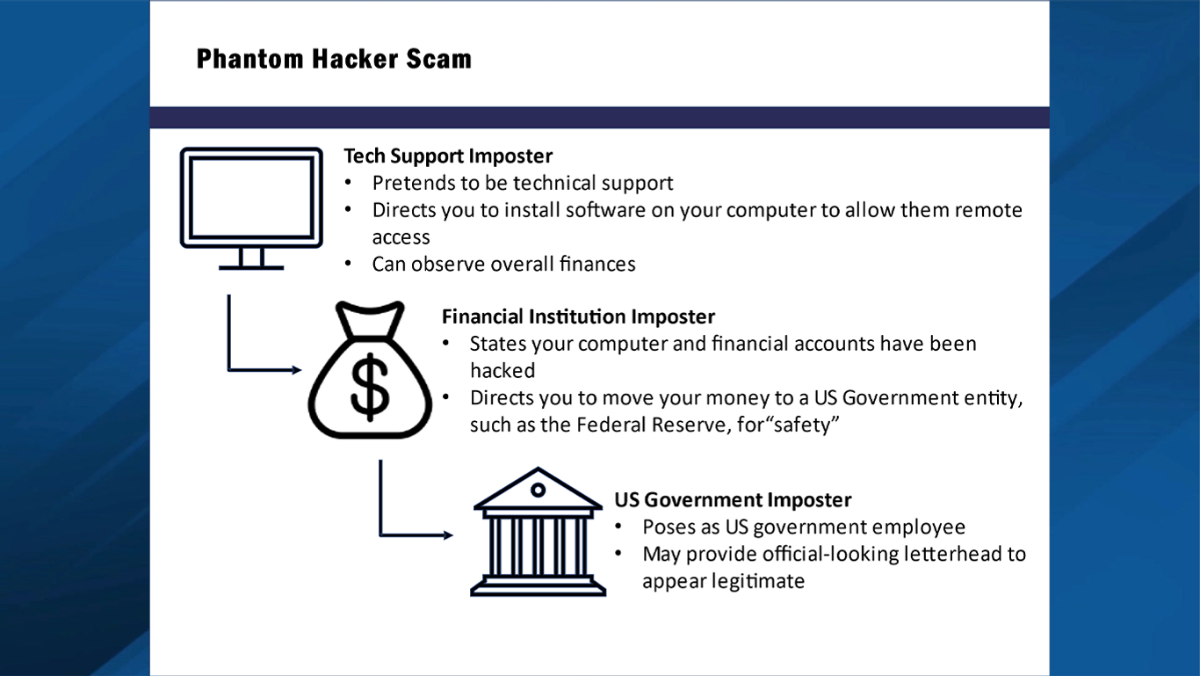
Phantom Hacker Scammers pose as technology support representatives from legitimate companies, such as Microsoft or Apple, and contact victims by phone, email, or pop-up window. They tell victims that their computers have been hacked or are at risk of being hacked and that they need to take immediate action to protect their devices.
Phantom Hacker Scammers then try to convince victims to install malware on their computers or to give them remote access to their devices. Once they have access to a victim’s computer, scammers can steal personal and financial information, or they can lock the computer and demand a ransom to unlock it.
The Phantom Hacker scam is particularly dangerous because it targets older adults, who are more likely to be trusting and less likely to be familiar with technology scams. Scammers also use sophisticated tactics to trick victims, such as caller ID spoofing and social engineering.
How the Phantom Hacker Scam Works
The Phantom Hacker scam typically unfolds in the following steps:
- The Phantom Hacker scammer contacts the victim by phone, email, or pop-up window. They pose as a technology support representative from a legitimate company, such as Microsoft or Apple.
- The scammer tells the victim that their computer has been hacked or is at risk of being hacked. They may claim to have detected suspicious activity on the victim’s account, or they may claim that the victim’s computer has been infected with a virus.
- The scammer tells the victim that they need to take immediate action to protect their device. They may offer to install malware on the victim’s computer, or they may ask the victim to give them remote access to their device.
- Once the Phantom Hacker scammer has access to the victim’s computer, they can steal personal and financial information, or they can lock the computer and demand a ransom to unlock it.
The Phantom Hacker Tech Support Scam Process
The Phantom Hacker scam is a type of tech support scam that targets older adults. Scammers pose as technology support representatives from legitimate companies, such as Microsoft or Apple, and contact victims by phone, email, or pop-up window. They tell victims that their computers have been hacked or are at risk of being hacked, and that they need to take immediate action to protect their devices.
Scammers then try to convince victims to install malware on their computers or to give them remote access to their devices. Once they have access to a victim’s computer, scammers can steal personal and financial information, or they can lock the computer and demand a ransom to unlock it.
The Phantom Hacker scam is particularly dangerous because it targets older adults, who are more likely to be trusting and less likely to be familiar with technology scams. Scammers also use sophisticated tactics to trick victims, such as caller ID spoofing and social engineering.
How the Phantom Hacker Scam Process Works
The Phantom Hacker scam process typically unfolds in the following steps:
- Initial contact: Scammers contact the victim by phone, email, or pop-up window. They pose as technology support representatives from a legitimate company, such as Microsoft or Apple.
- Establishing credibility: Scammers may use caller ID spoofing to make their phone number appear as if it belongs to a legitimate company. They may also use social engineering tactics to gain the victim’s trust, such as pretending to know the victim’s name or address.
- Creating a sense of urgency: Scammers tell the victim that their computer has been hacked or is at risk of being hacked. They may claim to have detected suspicious activity on the victim’s account, or they may claim that the victim’s computer has been infected with a virus. They may also tell the victim that they need to take immediate action to protect their device.
- Requesting remote access: Scammers ask the victim to give them remote access to their computer. They may claim that they need to install software on the victim’s computer to fix the problem, or they may claim that they need to scan the victim’s computer for malware.
- Stealing information: Once the scammer has remote access to the victim’s computer, they can steal personal and financial information, such as credit card numbers, bank account numbers, and Social Security numbers. They may also install malware on the victim’s computer, which can be used to steal additional information or to lock the computer and demand a ransom to unlock it.
- Demanding a ransom or payment: In some cases, scammers may lock the victim’s computer and demand a ransom to unlock it. They may also threaten to release the victim’s personal or financial information if they do not pay the ransom.
How Scammers Interact with Victims
Scammers who use the Phantom Hacker scam are typically very skilled at manipulating and exploiting their victims. They may use a variety of tactics, such as:
- Fear-mongering: Scammers may try to scare victims into giving them remote access to their computers or paying a ransom. They may claim that the victim’s computer is infected with a dangerous virus or that their personal or financial information is at risk.
- Social engineering: Scammers may use social engineering tactics to gain the victim’s trust. They may pretend to know the victim’s name or address, or they may claim to be from a legitimate company.
- Pressure: Scammers may try to pressure victims into making quick decisions. They may tell victims that they need to act immediately to protect their computer or their personal and financial information.
How Scammers Get Their Money
Scammers can get their money from victims in a number of ways, including:
- Bank transfers: Scammers may ask victims to wire money to them directly.
- Gift cards: Scammers may ask victims to purchase gift cards and then give them the gift card numbers.
- Cryptocurrency: Scammers may ask victims to pay them in cryptocurrency, such as Bitcoin.
How to Protect Yourself from the Phantom Hacker Scam
There are a number of things you can do to protect yourself from the Phantom Hacker scam:
- Be wary of unsolicited technical support calls and emails. Legitimate companies will not contact you out of the blue to offer technical support.
- Do not give remote access to your computer to anyone you do not know and trust.
- Do not install software on your computer from unknown sources.
- Keep your software up to date. Software updates often include security patches that can protect your computer from malware.
- Use a strong password manager to create and manage strong passwords for all of your online accounts.
- Enable two-factor authentication on all of your online accounts. Two-factor authentication adds an extra layer of security to your accounts by requiring you to enter a code from your phone in addition to your password when you log in.
What to Do If You Think You’ve Been a Victim of the Phantom Hacker Scam
If you think you may have been a victim of the Phantom Hacker scam, it is important to take the following steps:
- Disconnect your computer from the internet. This will prevent the scammer from stealing any more information or locking your computer.
- Scan your computer for malware using an antivirus program such as Malware Bytes or Bitdefender.
- Change all of your passwords, especially your online banking and credit card passwords.
- Contact your bank and credit card companies to let them know that you may have been a victim of fraud.
- Report the scam to the Federal Trade Commission (FTC) – visit reporting.AgainstScams.org to learn how.
Tips for Talking to Elderly Relatives About the Phantom Hacker Scam
If you have elderly relatives, it is important to talk to them about the Phantom Hacker scam and other types of scams that target older adults. Here are some tips:
- Explain to them that they should be wary of any unsolicited technical support calls or emails.
- Tell them that they should never give remote access to their computer to anyone they do not know and trust.
- Encourage them to keep their software up to date and to use strong passwords and two-factor authentication for all of their online accounts.
- Let them know that they should contact you if they receive any suspicious calls or emails, or if they have any concerns about their computer security.
By taking these steps, you can help to protect yourself and your loved ones from the Phantom Hacker scam and other types of scams.
More:
- Scam Basics: Tech Support Scams (romancescamsnow.com)
- Avoid Microsoft Tech Support Scams (romancescamsnow.com)
- Scam Tip: Avoiding Tech Support Scams (romancescamsnow.com)
- Google Voice Scam – How Scams Work (romancescamsnow.com)
- Missing Persons Scam – How Scams Work (romancescamsnow.com)
- Police Impersonation Scam Phone Calls – How Scams Work (romancescamsnow.com)
- The Refugee Romance Scam – How Scams Work (romancescamsnow.com)
- How Scams Work – Topic Page (romancescamsnow.com)
Always Report All Scams – Anywhere In The World To:
Go to reporting.AgainstScams.org to learn how
U.S. FTC at https://reportfraud.ftc.gov/#/?orgcode=SCARS and SCARS at www.Anyscams.com
Visit reporting.AgainstScams.org to learn more!
Glossary Search
Table of Contents
To Understand All Scams
Read This
The SCARS Institute Relationship Scams Formula Checklist
This is the Formula that all Relationship Scams Follow
ARTICLE CATEGORIES


In the U.S. & Canada
U.S. & Canada Suicide Lifeline 988

Get Organized Now – FREE
Organize the Records from Your Crime here: The SCARS Institute’s RED BOOK free Online Edition
A Tool to help you collect your information and make it more presentable to the Police, Banks, and for Your Records.
100% safe, private, and confidential. Only you see it.
 SCARS Institute Insight
Free, Safe, and Confidential After-Scam Healing & Support is Available from the SCARS Institute
Join Us www.SCARScommunity.org
Please Leave A Comment!
Please tell us what you took from this?
Commenting is an essential part of healing
Read • Think • Write
Recent Comments
On Other Articles
[better_recent_comments number="10″ format=" on : "" October 31st, 2026" avatar_size="30″]
Important Information for New Scam Victims
- Please visit www.ScamVictimsSupport.org – a SCARS Website for New Scam Victims & Sextortion Victims
- Enroll in FREE SCARS Scam Survivor’s School now at www.SCARSeducation.org
- Please visit www.ScamPsychology.org – to more fully understand the psychological concepts involved in scams and scam victim recovery
If you are looking for local trauma counselors please visit counseling.AgainstScams.org or join SCARS for our counseling/therapy benefit: membership.AgainstScams.org
If you need to speak with someone now, you can dial 988 or find phone numbers for crisis hotlines all around the world here: www.opencounseling.com/suicide-hotlines
A Note About Labeling!
We often use the term ‘scam victim’ in our articles, but this is a convenience to help those searching for information in search engines like Google. It is just a convenience and has no deeper meaning. If you have come through such an experience, YOU are a Survivor! It was not your fault. You are not alone! Axios!
A Question of Trust
At the SCARS Institute, we invite you to do your own research on the topics we speak about and publish, Our team investigates the subject being discussed, especially when it comes to understanding the scam victims-survivors experience. You can do Google searches but in many cases, you will have to wade through scientific papers and studies. However, remember that biases and perspectives matter and influence the outcome. Regardless, we encourage you to explore these topics as thoroughly as you can for your own awareness.
Statement About Victim Blaming
SCARS Institute articles examine different aspects of the scam victim experience, as well as those who may have been secondary victims. This work focuses on understanding victimization through the science of victimology, including common psychological and behavioral responses. The purpose is to help victims and survivors understand why these crimes occurred, reduce shame and self-blame, strengthen recovery programs and victim opportunities, and lower the risk of future victimization.
At times, these discussions may sound uncomfortable, overwhelming, or may be mistaken for blame. They are not. Scam victims are never blamed. Our goal is to explain the mechanisms of deception and the human responses that scammers exploit, and the processes that occur after the scam ends, so victims can better understand what happened to them and why it felt convincing at the time, and what the path looks like going forward.
Articles that address the psychology, neurology, physiology, and other characteristics of scams and the victim experience recognize that all people share cognitive and emotional traits that can be manipulated under the right conditions. These characteristics are not flaws. They are normal human functions that criminals deliberately exploit. Victims typically have little awareness of these mechanisms while a scam is unfolding and a very limited ability to control them. Awareness often comes only after the harm has occurred.
By explaining these processes, these articles help victims make sense of their experiences, understand common post-scam reactions, and identify ways to protect themselves moving forward. This knowledge supports recovery by replacing confusion and self-blame with clarity, context, and self-compassion.
Additional educational material on these topics is available at ScamPsychology.org – ScamsNOW.com and other SCARS Institute websites.
Psychology Disclaimer:
All articles about psychology and the human brain on this website are for information & education only
The information provided in this article is intended for educational and self-help purposes only and should not be construed as a substitute for professional therapy or counseling.
While any self-help techniques outlined herein may be beneficial for scam victims seeking to recover from their experience and move towards recovery, it is important to consult with a qualified mental health professional before initiating any course of action. Each individual’s experience and needs are unique, and what works for one person may not be suitable for another.
Additionally, any approach may not be appropriate for individuals with certain pre-existing mental health conditions or trauma histories. It is advisable to seek guidance from a licensed therapist or counselor who can provide personalized support, guidance, and treatment tailored to your specific needs.
If you are experiencing significant distress or emotional difficulties related to a scam or other traumatic event, please consult your doctor or mental health provider for appropriate care and support.
Also read our SCARS Institute Statement about Professional Care for Scam Victims – click here to go to our ScamsNOW.com website.

